
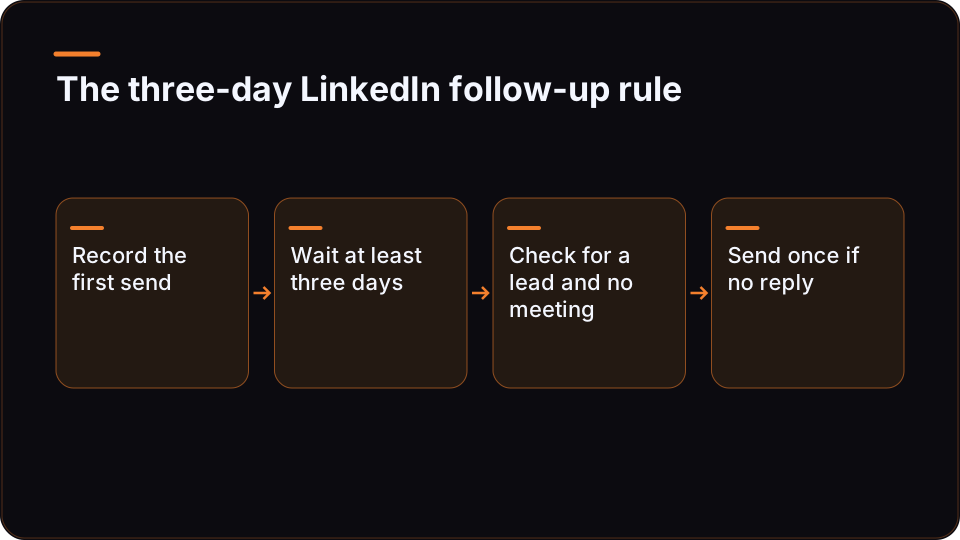
A Dripify alternative is worth testing when HubSpot, not the sequence tool, should decide whether a LinkedIn follow-up goes out. Dripify runs the delay and conditions inside its own sequence. With HubSpot, n8n and ReachMCP, the rule lives in your CRM and workflow, and ReachMCP only carries out the LinkedIn action. You gain control and take on build work.
This comparison uses one rule on one LinkedIn account: send a follow-up three days after the first message if the contact is still a lead in HubSpot, and stop as soon as a meeting is booked. It is a conceptual pilot. Nothing below was run against a live account, no message was sent and no real contact was used.
Executive summary
| Question | Dripify native sequence | HubSpot + n8n + ReachMCP |
|---|---|---|
| Where the follow-up rule lives | Inside the Dripify sequence (delays and conditions) | In HubSpot properties, evaluated by an n8n workflow |
| What stops the follow-up once a meeting is booked | Depends on whether a HubSpot change can reach an active Dripify sequence: not established by the sources available for this comparison | n8n re-reads HubSpot just before sending; a booked meeting means no send |
| Ready-made interface | Sequence builder and team features | None: ReachMCP has no sequence interface or production inbox |
| Who maintains the logic | Dripify, plus your configuration | Your n8n builder |
| Published price to start on one account | Not compared here: check Dripify's own pricing | ReachMCP Standard list price of $20 a month for the first account, with n8n and HubSpot billed separately |
Stay with Dripify if your operators live in a sequence builder, nobody on the team maintains n8n workflows, or Dripify confirms that a HubSpot status change can stop an active sequence on your plan. In that last case you get the rule without building it.
Test the CRM-controlled route if HubSpot is already the place your team trusts for "is this still a lead?", you have someone who builds in n8n, and you want every follow-up to be checked against the CRM at the moment it is sent. Test it on one account, without sending anything at first.
The follow-up rule we are comparing
Comparisons of LinkedIn automation tools usually list features. This one fixes a single rule and asks which system has to know what, and when.
- Day 0. The first LinkedIn message goes out from the account. The send time is written to the HubSpot contact.
- Day 3. If the contact is still a lead in HubSpot, has no meeting booked and has not replied, one follow-up goes out.
- Stop. As soon as a meeting is booked, no further follow-up is sent, whatever the schedule says.
"Still a lead" means whatever your team already uses: a lifecycle stage, a lead status, or a custom property. The important part is the stop condition. A meeting can be booked outside LinkedIn: through a calendar link, by a sales rep on a call, or by a colleague replying from email. In that case the fact reaches the CRM first, not the LinkedIn tool. Whichever tool sends the follow-up has to learn about the meeting before its next send. That single requirement drives the rest of this comparison.
What Dripify handles natively
Dripify's help centre presents it as a LinkedIn and email prospecting platform with sequences, conditions, lead sources and team features (observed 15 October 2026). For this rule, that means the three-day delay and the conditional steps are configured inside Dripify, in an interface built for the people who run campaigns. There is no workflow to design, no credential to manage between tools and no code to maintain. For many agencies that is the right trade.
Two other pages in Dripify's help centre are worth reading yourself before you compare further: the integrations article and the MCP article. We could not read either while preparing this comparison, so this article makes no statement about which tools Dripify connects to, whether HubSpot is one of them, or what an MCP connection would offer. The question that matters for this rule is narrow: can a change in HubSpot stop or redirect a Dripify sequence that is already running for that contact, and on which plan?
The sources available for this comparison do not answer that, either way. We have not tested any Dripify integration or API. Treat it as an open item to check, not as a missing feature. Three questions to put to Dripify support, or to test during an evaluation:
- Does Dripify integrate with HubSpot on your plan, and if it does, in which direction: does it carry changes from HubSpot back into Dripify, or only send Dripify leads and activity to HubSpot?
- Can an API call, a webhook or any MCP tool Dripify may provide pause one lead in an active campaign, or remove it, and what plan or access does that need?
- How soon does that change take effect compared with the next scheduled step?
If the answer to the first or second question is yes, compare the setup effort honestly. A stop that Dripify already handles may need far less work than the route below.
Who owns what in the CRM-controlled route
In the alternative route, three tools share the rule. None of them is a sequence tool, and that is the point: the sequence becomes a series of separate decisions taken against the CRM.
| Job in the rule | Owner | What that means in practice |
|---|---|---|
| Source of truth for "still a lead" and "meeting booked" | HubSpot | Your properties and pipeline rules; the workflow only reads them |
| Day-3 timing | n8n | A scheduled workflow finds contacts whose first message is at least three days old |
| The decision to send | n8n | Re-reads the contact in HubSpot right before sending; missing data means no send |
| Human approval | n8n (your own step) | ReachMCP playbook previews are instructions the assistant follows, not a server-enforced approval; direct API calls can write without approval |
| Reply check | ReachMCP and n8n | ReachMCP can read conversations; reply webhooks come from documented polling, up to around six minutes |
| Sending the follow-up | ReachMCP | The message goes out from the connected account over REST (an X-API-Key header) or MCP |
| Retry safety | ReachMCP and n8n | An optional idempotency key, scoped per credential; it is not exactly-once delivery |
| Writing the outcome back | n8n | Logs "follow-up sent" on the contact; ReachMCP has no native CRM connector |
| Account connection | ReachMCP | The account is connected through a Chrome Desktop extension and the holder's LinkedIn session |
| Pacing | ReachMCP | Per-account quotas you configure; they are not LinkedIn's official limits |
Two limits apply to the whole route. First, ReachMCP is a third-party service that acts through the account holder's session. It is not the official LinkedIn API, and it gives no guarantee of compliance with LinkedIn's terms, of non-suspension or of protection against bans. If your use case fits an official programme, start with the LinkedIn developer portal and the LinkedIn documentation on Microsoft Learn. Second, ReachMCP is not a campaign product. Its durable jobs run batches of one action type per account. That is not a branching sequence, and there is no sequence interface, no production inbox and no demonstrated sender rotation. Everything that makes the rule a "sequence" is yours to build.
Side-by-side: one rule, two architectures
| Criterion | Dripify native sequence | HubSpot + n8n + ReachMCP |
|---|---|---|
| Where the three-day delay is set | A delay step in the Dripify sequence | A schedule plus a date filter in n8n |
| What "still a lead" is checked against | Dripify's own lead data; the effect of a HubSpot change is to be confirmed | The HubSpot property, read at send time |
| Stop when a meeting is booked | To confirm with Dripify: path and plan not established here | Part of the design: the check fails and nothing is sent |
| Reply detection | To confirm with Dripify: which conditions a sequence can test (the source used here lists conditions, not their types) | Conversation read or reply webhook through ReachMCP (polling, up to around six minutes) |
| Interface for operators | Sequence builder and team features | None from ReachMCP; you work in the n8n canvas and HubSpot views |
| Channels | LinkedIn and email in one tool | LinkedIn only through ReachMCP; email needs another tool |
| Build and upkeep | Configuration in Dripify | Workflow design, HubSpot credential, field mapping, error handling, maintenance |
| Tested for this article | No | No: conceptual pilot only |
| Published price to start | Check Dripify's pricing page | $20 a month list price for the first account (USD); n8n, HubSpot and any Sales Navigator or Premium plan billed separately |
How to read the table: Dripify wins on readiness. You get an operator interface and two channels without building anything. The CRM-controlled route wins on one property only: the follow-up rule is checked in HubSpot at the moment of sending, by design. That property matters only if Dripify cannot provide it for your plan. This is not a general verdict on either tool, and nothing here measures replies, meetings or account safety.
If the CRM-controlled route matches how your agency already works, trying it on one account is cheap. Check the published per-account price and trial terms before you wire anything.
How to choose a Dripify alternative for CRM-led follow-ups
| Your situation | Better fit | Why |
|---|---|---|
| Operators run campaigns day to day and nobody maintains n8n | Dripify | A ready interface beats a workflow that nobody owns |
| Dripify confirms that a HubSpot change can stop an active sequence on your plan | Dripify; compare setup effort | You get the stop rule without building it |
| HubSpot status must veto every follow-up and you already run n8n | HubSpot + n8n + ReachMCP | The rule is checked at send time in the system your team already trusts |
| You need LinkedIn and email steps in the same sequence | Dripify or another multichannel tool | ReachMCP covers LinkedIn only |
| You run several client accounts and want one LinkedIn layer under your own tools | A one-account pilot of the CRM-controlled route first | Per-account keys and quotas fit that model; the sequence logic is still yours to build |
The deciding question is not "which tool has more features". It is who will own the follow-up rule in six months: a Dripify configuration your operators can see, or an n8n workflow your builder maintains.
Technical deep-dive: the pilot in n8n
Everything in this section is a conceptual pilot. It was not run against a live account. Property names, routes and header names are placeholders: take the real ones from your HubSpot setup and from the ReachMCP REST API reference.
Before you start
- One LinkedIn account connected to ReachMCP, and an API key restricted to that single account ID.
- A HubSpot credential in n8n that can read and update contacts.
- Three contact properties:
linkedin_url(normalised),linkedin_first_message_atandlinkedin_followup_sent_at, plus whatever already marks "meeting booked" in your portal.
Matching a LinkedIn person to a HubSpot contact is the same problem as matching a reply. The reply-to-CRM tutorial covers URL normalisation and deduplication, so this pilot does not repeat them. If you only hold names, resolve the profile first: reading a member profile from your own tools explains the prerequisites and the quota cost.
Step 1: record day 0
When the first message goes out, whether through ReachMCP or by hand, write linkedin_first_message_at on the contact. Without that timestamp there is no "three days", and the rest of the workflow has nothing to measure against.
Step 2: find candidates on a schedule
A scheduled n8n workflow runs once a day during UK working hours. It asks HubSpot for contacts where the first message is at least three days old, linkedin_followup_sent_at is empty and the status is still lead. Keep the batch small: this is one account, and every read and send uses that account's quota.
Step 3: re-check each contact right before sending
The candidate list can be hours old by the time a contact reaches the send node. Re-read each contact from HubSpot, then decide in a Code node running once for all items:
// n8n Code node, mode "Run Once for All Items".
// Conceptual pilot: not run against a live account.
// Property names and the lead value are placeholders for your own HubSpot setup.
const THREE_DAYS_MS = 3 * 24 * 60 * 60 * 1000;
const LEAD_VALUE = 'REPLACE_WITH_YOUR_LEAD_VALUE';
const now = Date.now();

const out = [];
for (const item of $input.all()) {
  const c = item.json; // contact as re-read from HubSpot in the previous node
  const firstAt = Date.parse(c.linkedin_first_message_at);
  const skip = [];

  if (Number.isNaN(firstAt)) skip.push('no first-message date');
  else if (now - firstAt < THREE_DAYS_MS) skip.push('less than three days');
  if (c.lead_status !== LEAD_VALUE) skip.push('no longer a lead');
  if (c.meeting_booked) skip.push('meeting booked');
  if (c.linkedin_followup_sent_at) skip.push('follow-up already sent');
  if (c.replied_on_linkedin) skip.push('replied');

  // Fail closed: any missing or unexpected value means no send.
  out.push({ json: { ...c, send: skip.length === 0, skip_reasons: skip } });
}
return out;
An IF node on send splits the items. Log the skip_reasons back to HubSpot or to a sheet: during a pilot, the skipped contacts tell you more than the sent ones.
Step 4: check LinkedIn for a reply
A prospect may have replied on LinkedIn without anyone updating HubSpot. Reply webhooks help, but they come from polling, up to around six minutes, so they can trail a very recent reply. Before sending, read the conversation with that person through ReachMCP's conversation endpoints, as listed in the REST reference. Each read uses quota on the account, which is another reason to keep batches small.
Step 5: approve, then send once
Add your own approval step before the send node: a review queue, or a message to the account owner. Do not rely on an assistant's preview for this. A direct API call can write without human approval.
Then send through ReachMCP with an idempotency key built from the contact, so that a retried execution does not send twice:
POST <message route from the ReachMCP REST reference>
X-API-Key: <key restricted to this one account>
<idempotency header, as named in the ReachMCP reference>: followup-1:<hubspot_contact_id>
The key is optional, scoped to the credential and time-limited. It protects retries of that write. It does not make the whole workflow exactly-once.
Step 6: write back, and understand how "stop" works
After a successful send, write linkedin_followup_sent_at on the contact. That is also what prevents a second follow-up.
Here is the main difference from a native sequence: there is no running sequence to stop. Each send is a fresh decision taken against HubSpot. A meeting booked at 10:02 blocks a send planned for 10:05, as long as the re-read in step 3 happens after HubSpot records the meeting. What remains is a narrow window: the seconds between the re-read and the send, plus any delay before the meeting reaches HubSpot.
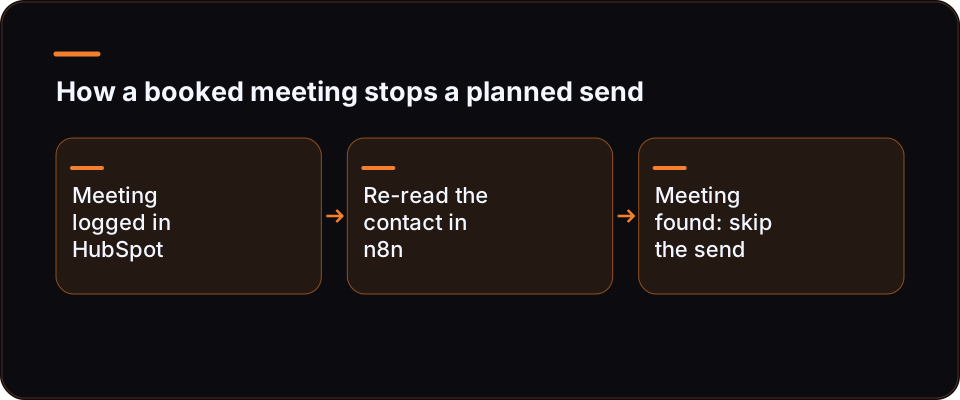
For the same reason, keep this pilot to single sends rather than a ReachMCP durable job. A job queues a batch of identical actions, and cancelling a job does not undo actions it has already carried out. A batch built in the morning cannot see a meeting booked at lunchtime. A per-contact check can.
What this pilot does not prove
- It was not run. No message was sent, no real contact was used, and no reply, meeting or conversion rate was measured.
- It does not show that Dripify cannot do this. No Dripify integration or API was tested here. Ask Dripify first.
- It guarantees nothing about account safety, whichever route you choose. ReachMCP is not the official LinkedIn API and does not promise protection against restrictions or bans.
- It is not free to run. HubSpot property changes, n8n credential rotation, LinkedIn session reconnection and error alerts all need an owner.
- It is not instant. Reply detection relies on polling, and HubSpot only knows about a meeting once someone or something records it.
Try it on one account first
The reason to try this on one account is specific: the follow-up rule is something you can check against your own CRM data before any message goes out.
- Connect one account and build steps 1 to 4 with the send node disabled.
- Let the workflow run for a week and log every decision it would have taken.
- Review the log against HubSpot. Did any contact with a booked meeting reach
send: true? Did every skipped contact get a clear reason? - Only then enable approval and sending, still on that one account.
On cost, the published ReachMCP Standard list rate is $20 a month for the first connected account, in USD. Check the checkout currency and taxes for your own case. The pricing page also offers a seven-day trial without a card, starting from the first LinkedIn action (observed 16 November 2026). n8n, HubSpot and any Sales Navigator or Premium subscription are billed separately by their providers. These are list prices for a pilot, not a total cost of ownership or a saving against Dripify.
Next steps
If you want to go deeper on the other half of the loop, our tutorial on routing LinkedIn replies into HubSpot or any CRM with n8n shows how replies reach the contact record, with matching and deduplication. Your day-3 check depends on that data.
If you are ready to build the dry run, start from the ReachMCP n8n integration guide: connect one account, restrict a key to it, and wire steps 1 to 4 with sending switched off.
FAQ
What is the best Dripify alternative for CRM-controlled follow-ups?
No single tool is best for every agency. If your operators need a sequence builder and LinkedIn plus email in one place, a campaign tool such as Dripify is the more direct fit. If the rule is "HubSpot decides, every time", and you already run n8n, a composed route works: HubSpot holds the status, n8n holds the schedule and the decision, and a LinkedIn access layer such as ReachMCP carries out the send. The trade is build and maintenance work in exchange for a check at send time. Check first with Dripify whether a HubSpot change can already stop a running sequence on your plan.
Can Dripify stop a sequence when a HubSpot status changes?
The sources available for this comparison do not establish it either way. We could not read Dripify's help pages on integrations or MCP, so this article does not say whether Dripify connects to HubSpot, or how. Two things to confirm with Dripify: whether a HubSpot integration exists on your plan and in which direction it syncs, and whether a HubSpot change can stop or redirect a sequence that is already running for that contact. Ask Dripify support directly, or test it during an evaluation: change a test contact's status in HubSpot and check whether its next Dripify step still fires. If it stops, compare the setup effort before building anything in n8n.
Does ReachMCP have a sequence builder?
No. ReachMCP exposes LinkedIn actions to assistants and workflows over MCP and REST. Its interface mainly connects and administers accounts, keys, quotas, jobs and webhooks. There is no sequence interface, no production inbox and no demonstrated sender rotation, and its durable jobs batch one action type per account rather than running a branching sequence. In the route described here, the sequence logic lives in n8n and the status lives in HubSpot. If your team wants to build and edit sequences visually, a campaign tool fits better.
How much work is the n8n workflow?
It depends on your HubSpot setup and on how much error handling you want, so this article gives no hours estimate. The pieces are known: three contact properties, a scheduled candidate search, a per-contact re-check, a LinkedIn reply check, an approval step, an idempotent send and a write-back. Matching people to contacts can take the most effort, which is why the reply-to-CRM tutorial covers it separately. Budget for upkeep too: credential rotation, property changes and session reconnection all need an owner after the build.
Is a CRM-controlled route safer for my LinkedIn account?
Neither route comes with a guarantee here. ReachMCP is a third-party service that acts through the account holder's session. It is not the official LinkedIn API, and it promises no compliance, no protection against suspension and no anti-ban outcome. Its quotas are limits you configure, not LinkedIn's official limits. What the CRM-controlled route does change is control: fewer follow-ups go to people who have already booked or replied, because each send is checked first. That is a process benefit, not an account-safety claim.
Can I build the same pilot in Make instead of n8n?
Yes, in principle. ReachMCP documents both n8n and Make guides based on the same pattern: HTTP calls to ReachMCP, then a handoff to other modules such as your CRM. The structure of the pilot does not change: a scheduled trigger, a HubSpot search, a per-contact re-check, an approval step, the send and a write-back. The parts that matter most are tool-independent: recording day 0 on the contact, checking HubSpot at send time and failing closed when data is missing.