
A LinkedIn people search API lets your code run a LinkedIn, Sales Navigator or Recruiter search and get back structured profile results instead of a browser page. In practice you have two routes: LinkedIn's official developer programmes, where access depends on what your app is approved for, or a third-party access layer that runs searches through a connected member's own session, with that member's subscription, quotas and account risk.
This guide covers the second route in detail, because that is where most implementation questions come from, and it is explicit about what that route does not give you.
Is there an official LinkedIn people search API?
LinkedIn publishes its developer programmes and their documentation on its own LinkedIn developer portal and in the LinkedIn API documentation on Microsoft Learn. Which products exist, who qualifies and what each one returns is LinkedIn's to define, and it changes over time. Before you build anything, check there whether a product your app can actually be approved for covers member search.
Do not assume it does. A common failure pattern is to design a pipeline around "the LinkedIn API", then discover at review time that the endpoint you needed is not part of what your app was granted.
If the official route does not fit, the alternative is a third-party service that executes searches on behalf of a connected LinkedIn account. ReachMCP is one of these. It is not the official LinkedIn API: its documentation describes using the account holder's session and LinkedIn's internal interfaces. That design choice determines every prerequisite and limit below.
How a session-based LinkedIn people search API works
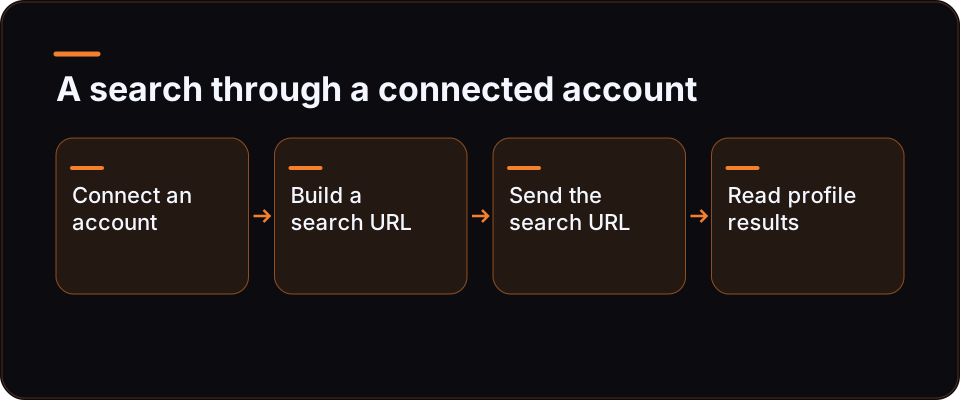
The mental model that saves the most debugging time: the search URL is the contract.
- A real LinkedIn member connects their account to the provider. With ReachMCP, the initial connection goes through a Chrome Desktop extension and the member's own LinkedIn session.
- Someone builds a search with the filters they want, in LinkedIn, Sales Navigator or Recruiter. The filters end up encoded in the search URL.
- Your code sends that URL to the provider, scoped to the connected account.
- The provider runs the search as that member and returns structured results.
Because the filters live in the URL, your code does not need to model LinkedIn's filter taxonomy for basic use. Copy a URL that already returns the right people, and the API reproduces that search. The flip side: if the URL is wrong, the API faithfully returns the wrong people.
Building the URL programmatically is a separate problem. ReachMCP documents tools that resolve industries, autocomplete geography, companies, schools and titles, and construct a Sales Navigator search URL from filters. That is the Sales Navigator API angle in its own right, and it carries its own caveat: an assistant translates the request into identifiers, and nothing guarantees the identifiers are always correct. Check the generated URL in Sales Navigator before running it at scale.
Prerequisites before your first call
Treat this as a checklist. Each item fails differently.
| Prerequisite | Why it matters | What happens if it is missing |
|---|---|---|
| A connected LinkedIn account | The search runs as that member, through their session | No account, no search; a disconnected session stops results |
| The right LinkedIn subscription for the URL | Sales Navigator search paths need Sales Navigator; Recruiter paths need Recruiter. The provider does not include these subscriptions | The search URL does not resolve for that account |
| An API key restricted to that account | ReachMCP keys can be limited to specific accounts (allowed_account_ids) |
A broad key works, but it widens the blast radius if leaked |
| Quota headroom on the account | Reads, including search imports, consume quotas | Requests are capped until the window allows more |
| Somewhere to put the results | No ready CRM sync for every tool | You write the mapping, deduplication and storage |
Two details developers often miss. First, the subscription belongs to the member, not to your integration: if you run searches for several clients, each client account needs its own Sales Navigator or Recruiter seat for those paths. Second, key restriction is exposed by the API contract and the dashboard; server-side isolation has not been independently tested, so keep your own per-client separation as well.
Running a people search over REST
ReachMCP exposes both MCP and REST. REST authenticates with an X-API-Key header, and the main documentation uses app.reachmcp.com/api as the base (some landing pages show an api.reachmcp.com host instead; follow the documentation you are reading). The exact route and field names for search-by-URL come from the REST reference, so the snippet below keeps them as named constants rather than guessing them.
// people-search.mjs - Node 18+ (global fetch)
// Fill SEARCH_ROUTE and the body field names from the ReachMCP REST reference.
// They are deliberately not hard-coded here.
const BASE_URL = 'https://app.reachmcp.com/api';
const SEARCH_ROUTE = process.env.REACH_SEARCH_ROUTE; // e.g. the documented search-by-URL route
const API_KEY = process.env.REACH_API_KEY;           // key restricted to ONE account
const ACCOUNT_ID = process.env.REACH_ACCOUNT_ID;     // the connected LinkedIn account

// A search you built and checked in LinkedIn or Sales Navigator first.
const searchUrl = process.argv[2];
if (!SEARCH_ROUTE || !API_KEY || !ACCOUNT_ID || !searchUrl) {
  console.error('usage: REACH_SEARCH_ROUTE=... REACH_API_KEY=... REACH_ACCOUNT_ID=... node people-search.mjs "<search url>"');
  process.exit(2);
}

const res = await fetch(`${BASE_URL}${SEARCH_ROUTE}`, {
  method: 'POST',
  headers: { 'X-API-Key': API_KEY, 'Content-Type': 'application/json' },
  // Field names below are placeholders: map them to the reference.
  body: JSON.stringify({ account_id: ACCOUNT_ID, url: searchUrl }),
});

if (!res.ok) {
  // Treat quota and session errors as expected states, not crashes.
  console.error(`search failed: HTTP ${res.status}`, await res.text());
  process.exit(1);
}

const results = await res.json();
// Write to your own store here. Deduplicate on a stable profile identifier,
// because the same person will appear in overlapping searches.
console.log(JSON.stringify(results, null, 2));
Design choices worth keeping when you adapt it:
- One key per account, or per client. Restricting the key keeps a bug in one client's workflow from reading another client's account.
- Check the URL first, call second. A search that returns 40 relevant people in the UI is a better test input than one that returns thousands of loosely matched ones.
- Deduplicate on your side. The provider returns what the search returns. Overlapping searches return overlapping people.
- Plan for errors that are states. An expired session or an exhausted quota is a normal condition in this setup. Log it, surface it, and retry later rather than in a tight loop.
Running the same search from an assistant over MCP
If your "tool" is Claude, ChatGPT or another MCP client rather than a script, the same search can run through ReachMCP's remote MCP server, which supports OAuth or an API key. The documented catalogue exposes tools and playbooks, with a core profile to keep the visible tool list short and a reach_playbooks entry point.
The MCP route changes who writes the search. Instead of pasting a URL, you can describe the people you want and let the assistant use the Sales Navigator search-building tools. That is convenient and also where errors creep in, because the assistant picks the identifiers. Compatibility also depends on each MCP client's own capabilities and plan. For automation tools such as n8n or Make, the documented pattern is an HTTP call to ReachMCP followed by handoff to other modules, which is the REST route above wired into a workflow.
Limits: the three layers that cap a people search
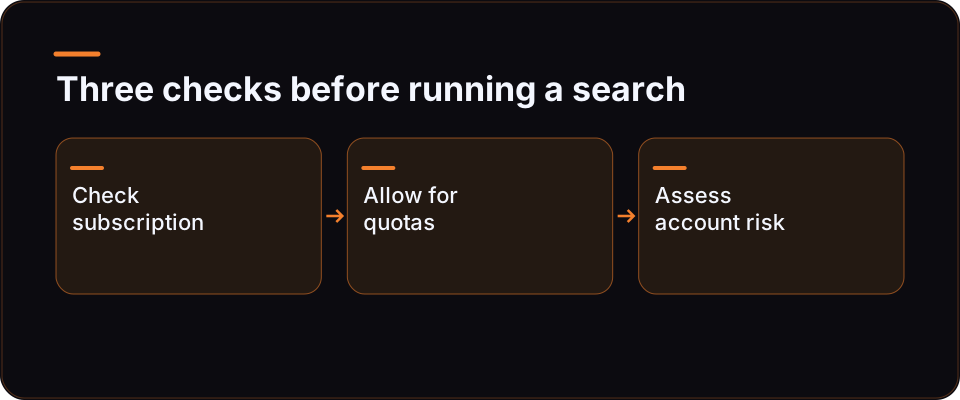
Limits on a session-based LinkedIn people search API come from three separate places. Mixing them up is the main source of wrong expectations.
| Layer | Who sets it | What it means for your code | What it does not mean |
|---|---|---|---|
| LinkedIn subscription | LinkedIn, per member | Which search paths the account can run at all (Sales Navigator, Recruiter) | Paying for a seat does not raise provider quotas |
| Provider quotas and pacing | ReachMCP, configurable per action family and per account, plus a global LinkedIn request cap and a minimum re-read delay | Your request rate per account is bounded; reads consume quota | These are not LinkedIn's official guaranteed limits |
| Account risk | LinkedIn's own enforcement, which is not published as a contract | Searches run as a real member, so that member's account carries the risk | No provider can guarantee non-suspension, compliance or throughput |
What this rules out. There is no unlimited extraction here, and any provider that promises it is describing something other than a member-session search. ReachMCP's quotas are configurable limits on the ReachMCP side; a "reads are free" shortcut in some documentation ignores the global and messaging caps. Proxy and location fields exist per account and a residential proxy is announced as provided, but that is not an anti-ban guarantee and no quantified risk comparison exists.
What it means for architecture. Size your pipeline per connected account, not per API key. If you need more search capacity, the honest options are fewer, better-targeted searches, or more connected accounts that each belong to a real member with the right subscription, each with its own quota.
What you still build yourself
A people search API returns people. Everything that turns that into a working pipeline is yours:
- Storage and deduplication across searches and across client accounts.
- CRM mapping. There is no ready CRM sync for every tool; authorisations and field mapping are integration work.
- Scheduling. ReachMCP documents durable jobs for batches per account and action type over an activity window, with pause, resume and cancel. Server-side execution and spacing are described in the contract, not independently tested, and cancelling a job does not undo actions already done.
- Notifications. Webhooks can report quota and job progress. Reply and connection events come from documented polling, up to around six minutes, so do not build anything that assumes instant delivery.
- Supervision. Someone has to notice when a session drops or a search URL stops matching what it used to.
Choosing your route
| Your situation | Route to evaluate first | Why |
|---|---|---|
| Your app qualifies for an official LinkedIn product that covers member search | The official programme | Access is granted by LinkedIn directly, within its terms |
| You run searches for your own or clients' accounts and already have Sales Navigator or Recruiter seats | A session-based access layer | Reuses the member's existing search and subscription |
| You need very large, unattended extraction | Neither, as stated | Member-session searches are quota-bound and carry account risk |
| You want an assistant to build the search from a description | MCP route, with URL checking | Convenient, but identifiers need review |
ReachMCP is one session-based option among several; Unipile, for example, also offers LinkedIn API access, and ReachMCP has no general advantage over it. If you are weighing those two, the ReachMCP and Unipile comparison page sets out the differences ReachMCP documents.
Next steps
If you want to go deeper on building the search itself, the Sales Navigator side (filters, lists and search URLs built from plain language) is the natural follow-on topic to this guide. If you are ready to wire a search into your own code, start from the ReachMCP REST API integration page, connect one account, restrict one key to it, and run a single search URL you have already checked in LinkedIn. Other wiring options are listed on the integrations overview, and the product itself is described on the ReachMCP homepage.
FAQ
Is there a free LinkedIn people search API?
Not in the sense of open, unauthenticated access. LinkedIn's official programmes have their own access rules, documented on its developer portal. Session-based providers run searches as a connected member, so they need that member's account and, for Sales Navigator or Recruiter search paths, the matching subscription, which the provider does not include. Provider pricing is separate again. Whatever route you choose, assume access is gated and bounded: by approval on the official side, by subscriptions, quotas and account risk on the third-party side.
Can I search LinkedIn profiles by keyword through an API?
With a session-based provider such as ReachMCP, the documented approach is search by URL: you build a LinkedIn, Sales Navigator or Recruiter search with your keywords and filters, then send that URL through the API. The filters travel inside the URL, so whatever the UI search returns for that account is what the API reproduces. For Sales Navigator, ReachMCP also documents tools that construct the search URL from filters, but the identifiers an assistant picks still need checking.
Do I need Sales Navigator to use a LinkedIn people search API?
Only for Sales Navigator search paths. A standard LinkedIn search URL runs on a standard account, while Sales Navigator and Recruiter URLs need those subscriptions on the connected account. The subscription belongs to the LinkedIn member, so an agency running searches for several clients needs the right seat on each client account for those paths. The access provider does not bundle or replace LinkedIn subscriptions.
How many searches can I run per day?
There is no single number to rely on. With ReachMCP, quotas are configurable per action family and per account, with a global LinkedIn request cap and a minimum re-read delay, and reads consume quota. These are ReachMCP's limits, not LinkedIn's official guaranteed limits. LinkedIn's own enforcement sits on top and is not published as a contract. Design for per-account budgets, treat quota exhaustion as a normal state, and avoid tight retry loops.
Is using a third-party LinkedIn search API safe for my account?
No provider can guarantee it. Searches run through the account holder's session, so the risk sits with that LinkedIn account. ReachMCP provides proxy and location settings per account and announces a residential proxy, but that is not an anti-ban guarantee, and no compliance or non-suspension guarantee is offered. Read LinkedIn's User Agreement yourself and decide on volumes with that risk in mind.
Can I get emails from a LinkedIn people search API?
Not from ReachMCP: it reads profiles and search results, but no proprietary email enrichment is confirmed. If your workflow needs email addresses, that is a separate enrichment step with a separate provider, plus your own matching and deduplication logic. Keep the two steps distinct in your pipeline so you can tell which source each field came from.