
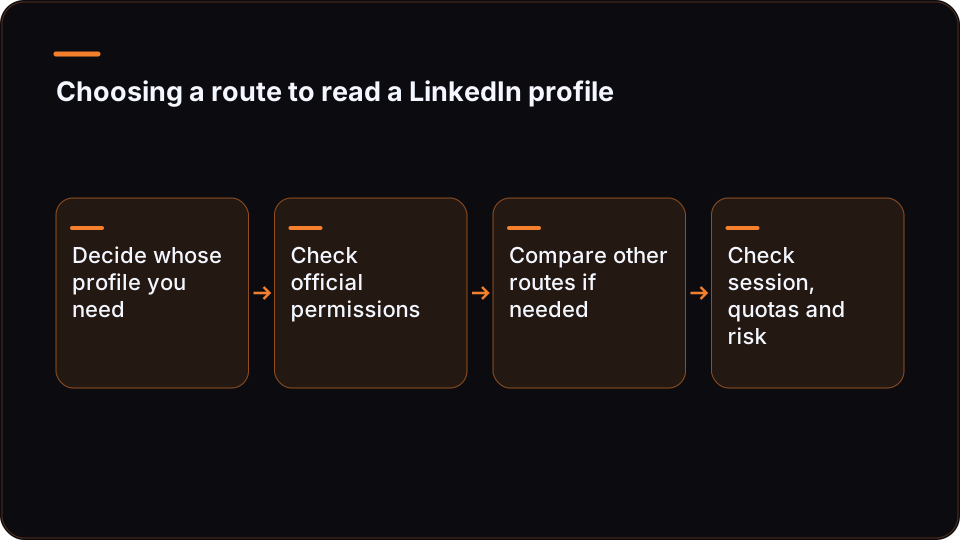
To get a LinkedIn profile through an API, first decide whose profile you need. LinkedIn's official access guide separates self-service permissions from permissions that need LinkedIn's approval, so what your app can read depends on what it is approved for. Reading other members' profiles from your own tools is where builders turn to third-party, session-based providers, which come with their own prerequisites, quotas and account risk.
This guide covers both routes, then shows how to read a profile over REST and over MCP (Model Context Protocol) with ReachMCP, a session-based provider, including the limits you need to design around.
LinkedIn API get profile: which route fits your case
Two questions decide the route before any code is written:
- Whose profile? The member who signs in to your app, or other members your users want to look up.
- Which data? Basic identity for sign-in, Sales Navigator data, or the profile content a logged-in LinkedIn user can see.
| Your situation | Route to evaluate | What to check first |
|---|---|---|
| You want profile data through LinkedIn's own programmes | LinkedIn's official permissions, self-service or approval-based | The getting-access guide, then each permission's own documentation for whose profile and which fields it returns |
| You need Sales Navigator data through LinkedIn itself | LinkedIn partner programme | LinkedIn's guide lists its Sales Navigator API permissions as requiring partner approval |
| You need to read other members' profiles from your scripts, workflows or AI assistant, and no official permission available to your app covers it | Third-party, session-based provider | Session prerequisites, per-account quotas, account risk, LinkedIn's terms |
| You need email addresses | A dedicated enrichment tool, outside this guide | Neither route below should be assumed to add emails |
| You want to export profiles in bulk with no ceiling | No route in this guide | Every route described here is capped |
The rest of the article follows that table from top to bottom.
What the official LinkedIn API gives you for profiles
LinkedIn documents its APIs on Microsoft Learn and runs app registration through the LinkedIn developer portal. The page to read before anything else is LinkedIn's getting-access guide. As observed on 2026-11-16, it splits permissions into two groups: those any developer can request through self-service, and those that require LinkedIn's approval. Its listed Sales Navigator API permissions are in the approval group and require partner approval.
The practical meaning for a profile read:
- Whose profile a permission returns is a per-permission question. The guide tells you which group a permission belongs to. Check that permission's own documentation for which profile fields it returns and for whom before you design around it.
- Access beyond what you can request yourself is a programme question, not an endpoint question. It depends on the programme and permissions LinkedIn approves for your app, as with the partner approval its guide lists for Sales Navigator API permissions.
- Price is not a given either way. LinkedIn's docs, as observed, give no per-call quote and do not establish a universal price or that official access is free. Confirm the terms of the programme you apply to.
Before you build on the official route, confirm three things in LinkedIn's own documentation, at the time you build:
- Which permission returns the profile fields you need, and which fields exactly.
- Whether that permission covers only the authenticated member or other members too.
- Whether your use case is eligible for self-service, or needs an application and approval.
If the answers fit your use case, use the official route. It is the only one LinkedIn itself defines.
When a session-based provider is the route
If your users need to read profiles of other members from their own tools, for example to qualify a prospect before outreach or to enrich a CRM record with a current job title, first check whether an official permission available to your app covers that read. If none does, this is where third-party providers come in.
ReachMCP is one of them, and it is not the official LinkedIn API. Its documentation describes acting through the connected account holder's own LinkedIn session and LinkedIn's internal interfaces. That has direct consequences:
- A profile read happens as that member, with what that member's account can see.
- ReachMCP offers no guarantee of compliance with LinkedIn's terms, no guarantee against restriction or suspension of the account, and no guaranteed throughput. Nothing in this guide is a legal interpretation; read LinkedIn's terms and decide for your use case.
- Compare any provider's documentation on the same points: whose session, which limits, what happens when the session drops.
Prerequisites before your first profile read
With ReachMCP, a profile read needs four things in place:
| Prerequisite | What it involves | Limit to know |
|---|---|---|
| Connected LinkedIn account | The account holder connects through an extension on Chrome Desktop, using their own LinkedIn session | Initial connection is done in Chrome Desktop, not from a server |
| API key | Created in the dashboard; can be restricted to specific connected accounts (allowed_account_ids), revealed, regenerated or revoked |
Restriction is exposed by the contract and dashboard; server-side isolation has not been independently tested |
| LinkedIn subscription where the path needs it | Premium for profile visitors; Sales Navigator or Recruiter for some search and read paths | ReachMCP does not include these subscriptions |
| Quota headroom | Reads consume ReachMCP quotas on the reading account | See the limits section before you loop |
Every call carries the identity of the account that performs it. Choosing which account reads a given profile is part of your design, not a detail: it decides whose session, whose quota and whose network visibility apply.
Reading a profile over REST
ReachMCP documents a profile-read contract in its REST API and MCP tools. REST calls authenticate with an X-API-Key header. The main documentation uses app.reachmcp.com/api as the base, while some landing pages show an api.reachmcp.com host, so follow the reference you are working from.
The exact route, parameter names and response fields belong to the reference, not to this article. The snippet below keeps them as named placeholders you fill once from the ReachMCP REST API integration page.
// Node 18+ (global fetch). Run server-side only: the API key must not reach a browser.
// PROFILE_ROUTE, ACCOUNT_PARAM and PROFILE_PARAM are placeholders. Copy them from the
// ReachMCP REST reference. If it documents a POST body instead of query parameters,
// move the two values into the body.
const BASE_URL = process.env.REACH_BASE_URL ?? 'https://app.reachmcp.com/api';
const API_KEY = process.env.REACH_API_KEY;
const PROFILE_ROUTE = 'REPLACE_WITH_PROFILE_READ_ROUTE';
const ACCOUNT_PARAM = 'REPLACE_WITH_ACCOUNT_PARAM_NAME'; // which connected account reads
const PROFILE_PARAM = 'REPLACE_WITH_PROFILE_PARAM_NAME'; // profile URL or identifier

async function getProfile(accountId, profileUrl) {
  const url = new URL(BASE_URL.replace(/\/+$/, '') + PROFILE_ROUTE);
  url.searchParams.set(ACCOUNT_PARAM, accountId);
  url.searchParams.set(PROFILE_PARAM, profileUrl);

  const res = await fetch(url, { headers: { 'X-API-Key': API_KEY } });
  if (!res.ok) {
    // Keep the body: quota, session and permission errors are told apart there.
    const err = new Error(`Profile read failed with HTTP ${res.status}`);
    err.status = res.status;
    err.body = await res.text();
    throw err;
  }
  return res.json(); // map fields from a real response, not from assumptions
}
Three habits make this hold up in production:
Map from a real response. Run one read against a profile you are allowed to look at, save the JSON, and write your field mapping from it. Treat every field as optional: what comes back depends on what the reading account can see.
Key your cache on the profile, not on the URL string. The same member shows up as different URL strings (trailing slash, query string, mixed case). Reduce the URL to its /in/ identifier before you cache or store:
// Reduce a public profile URL to a stable key, e.g. ".../in/Jane-Doe/?trk=x" -> "jane-doe".
// Sales Navigator and Recruiter links use other identifier forms: keep whatever form
// the ReachMCP reference expects for those paths instead of forcing them through this.
function profileKey(raw) {
  const match = new URL(raw.trim()).pathname.match(/^\/in\/([^/]+)/i);
  if (!match) throw new Error('Not a public /in/ member profile URL');
  return decodeURIComponent(match[1]).toLowerCase();
}

const cache = new Map();                 // swap for Redis or a database table
const MAX_AGE_MS = 14 * 24 * 3600 * 1000; // your refresh policy, not a ReachMCP rule

async function getProfileCached(accountId, profileUrl) {
  const key = profileKey(profileUrl);
  const hit = cache.get(key);
  if (hit && Date.now() - hit.at < MAX_AGE_MS) return hit.data;
  const data = await getProfile(accountId, profileUrl);
  cache.set(key, { at: Date.now(), data });
  return data;
}
Back off on quota errors, do not retry blindly. A read refused because the account hit a limit will be refused again a second later. Mark that account as paused for the window the error indicates, and read the exact status codes from the reference.
Reading the same profile from an assistant over MCP
If the profile read happens inside an AI assistant rather than your own code, ReachMCP exposes the same capability over a remote MCP server. The documentation uses app.reachmcp.com/mcp, with OAuth or an API key for authentication. Whether a given assistant can connect depends on that client's own MCP support and plan.
The public catalogue lists the available tools and playbooks, with a core profile that reduces the visible tool list and a reach_playbooks entry point. Take the profile tool's exact name and arguments from that catalogue. The catalogue documents the contract; it is not a live test of each tool.
The same rules apply as over REST: the read runs on one connected account, consumes that account's quota, and returns what that account can see.
Limits: quotas, caps and what a profile read will not give you
This is the section to read before you put getProfile in a loop.
| Layer | What it caps | Design consequence |
|---|---|---|
| Per-account quotas | ReachMCP limits configured per action family and per connected account | Spread reads across the accounts that legitimately need them; track usage per account |
| Global LinkedIn request cap | A ceiling on all LinkedIn requests an account makes through ReachMCP | Profile reads compete with searches, messages and other actions on the same account |
| Messaging read cap and re-read delay | Limits on reading conversations, plus a minimum delay before re-reading | Not a profile limit, but it shares the account's budget if your workflow also reads inbox data |
| LinkedIn subscription | Premium for profile visitors; Sales Navigator or Recruiter for some paths | A missing subscription is an access error, not a quota error |
Three points to keep straight:
- These are ReachMCP's configurable limits, not LinkedIn's official ones. You may see "reads are free of quota" in places; it is a documentation shortcut that ignores the global and messaging caps. Plan as if every read counts, because profile reads do consume quota.
- A profile read is not email enrichment. ReachMCP has no proprietary email enrichment. If your workflow needs emails, that is a separate tool with its own terms.
- It is not an extraction pipeline. Quotas exist so reads stay within a pace you configure per account; no setting removes the ceiling. If you need many reads, check whether ReachMCP's durable jobs reference covers your action type: jobs run batches per account and action type over an activity window with quotas. Their server-side execution, auto-resume and spacing are described in the documentation but have not been independently tested, and cancelling a job does not undo reads already done.
Residential proxies are provided per account, with proxy and location fields you can set. That is configuration, not protection: no provider can guarantee a LinkedIn account against restriction, and ReachMCP makes no anti-ban claim.
What you still build
A profile read returns data. Everything around it is your code:
- Account selection: which connected account reads which profile, and what happens when that account's session needs reconnecting.
- Storage and refresh: where profiles live, how long a cached copy is good enough, and what triggers a re-read.
- Mapping: field-by-field mapping into your CRM or database, with every field optional.
- Deduplication: one record per member, keyed on a stable identifier like
profileKeyabove. - Data handling: your own review of what you store about people and for how long. That is your organisation's call, not something a provider settles for you.
Next steps
If your starting point is a list of people rather than one known profile, our guide to running LinkedIn people searches from your own tools covers search URLs, subscriptions and the limits that apply there. Search results are one way to collect the profile URLs you then read.
If you are ready to make your first call, take the profile route, parameters and response fields from the ReachMCP REST API reference page, replace the three placeholders in the snippet above, and test against one profile before you add caching and backoff.
FAQ
Can I get any LinkedIn member's profile with the official LinkedIn API?
It depends on the permissions LinkedIn grants your app, so check before you build. LinkedIn's getting-access guide separates self-service permissions from permissions that need approval, and it lists its Sales Navigator API permissions as requiring partner approval. For each permission you consider, check in the current guide and that permission's documentation which profile fields it returns, confirm whether that permission covers only the authenticated member or other members too, and whether your use case is eligible for self-service. If you need to read other members' profiles from your own tools and no official permission available to you covers that, third-party, session-based providers are the alternative, with their own risks and limits.
Does a LinkedIn profile API return email addresses?
Do not assume it does. On the official side, check the exact fields each permission returns in LinkedIn's documentation. On the third-party side, ReachMCP reads the profile content the connected account can see and has no proprietary email enrichment, so it is not a way to obtain emails. If your workflow needs email addresses, use a dedicated enrichment service, review its terms and your own data-handling rules, and store the LinkedIn profile identifier alongside the email so you can match records later.
Do I need Sales Navigator to read a LinkedIn profile through an API?
Not for every path. With ReachMCP, some read and search paths need Sales Navigator or Recruiter on the reading account, and viewing who visited a profile needs Premium. These subscriptions are separate from ReachMCP and billed by LinkedIn. On the official side, LinkedIn lists its Sales Navigator API permissions as requiring partner approval, which is a programme application rather than a subscription you add to an account. Check which path your read uses before you budget for subscriptions.
How many LinkedIn profiles can I read per day?
There is no single number to quote. With ReachMCP, profile reads consume quotas that are configured per action family and per connected account, under a global LinkedIn request cap per account. These are ReachMCP's configurable limits, not official limits published by LinkedIn, and they are shared with every other action the same account performs. Design for a pace per account, cache profiles you have already read, and spread reads across the accounts that legitimately need them instead of pushing one account harder.
Is reading profiles through a third-party API safe for my LinkedIn account?
No provider can promise that. A session-based provider such as ReachMCP acts through the account holder's own LinkedIn session and LinkedIn's internal interfaces, and it is not the official LinkedIn API. ReachMCP gives no guarantee of compliance with LinkedIn's terms, of non-suspension or of throughput, and its provided proxies are configuration, not protection. What you control is pace, volume per account and the reason for each read. Read LinkedIn's terms, decide whether your use case fits, and keep reads tied to a real need.
Should I call the profile read from the browser?
No. Keep the API key on a server, in a backend function or inside an orchestrator such as n8n or Make, and restrict the key to the connected accounts that workflow uses. A key shipped in front-end code can be copied and used against every account it covers, and each misuse burns those accounts' quotas. Route browser requests through your own endpoint, which checks who is asking, picks the reading account and applies your cache before calling ReachMCP.