
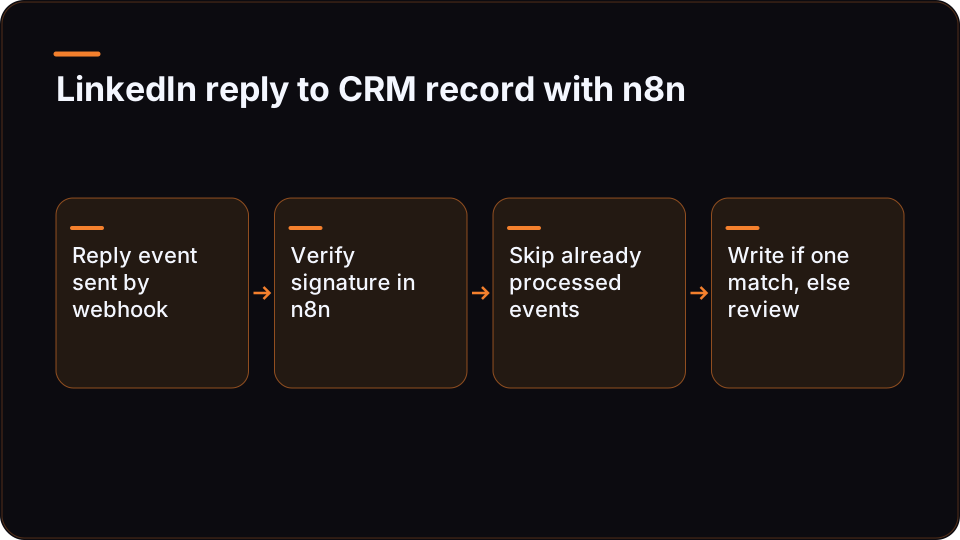
To send LinkedIn replies to your CRM, you need three parts: a source that emits an event when a prospect replies, an n8n workflow that receives and verifies that event, and a matching rule that finds the right CRM record before anything is written. The webhook is the easy part. The matching rule is the part that needs the most design.
This guide builds that workflow with ReachMCP as the event source and n8n as the orchestrator. The pattern is provider-neutral: if another service sends you a signed reply event, steps 1 to 6 still apply.
The workflow at a glance
Here is the whole flow before we build it piece by piece:
Prospect replies on LinkedIn
  -> ReachMCP detects the reply (documented polling, up to ~6 minutes)
  -> signed webhook POST to your n8n Webhook URL
  -> n8n: verify signature -> keep reply events only -> normalise fields
  -> build a dedup key, skip if already processed
  -> look up the CRM contact by LinkedIn profile URL
       -> exactly one match: log the reply, update stage, create a task
       -> zero or several matches: send to a human review queue
| n8n step | Job | What goes wrong without it |
|---|---|---|
| Webhook node | Receive the POST from ReachMCP | Nothing arrives |
| Signature check | Confirm the event came from your endpoint's secret | Anyone who finds the URL can write to your CRM |
| Event filter | Keep reply events, drop connection, quota and job events | Quota alerts get logged as "replies" |
| Normalise (Code node) | Pull account, sender, message and timestamp into fixed names | Every later node depends on payload paths |
| Dedup check | Skip events already written | Replays and retries create duplicate activities |
| Contact lookup | Find the CRM record by LinkedIn identity | Replies land on the wrong contact, or nowhere |
| CRM write | Log the reply, update fields, assign a task | The reply exists only in LinkedIn |
| Review branch | Park unmatched or ambiguous replies | Silent data loss or blind contact creation |
What ReachMCP gives you and what you build
ReachMCP is a third-party service that exposes LinkedIn to assistants and workflows over MCP (Model Context Protocol) and REST. It is not the official LinkedIn API: its documentation describes acting through the connected account holder's session and LinkedIn's internal interfaces, and it offers no guarantee of compliance with LinkedIn's terms or of non-suspension. If your use case qualifies for an official programme, check the LinkedIn developer portal and the LinkedIn API documentation on Microsoft Learn first; what you get there depends on what your app is approved for.
For this workflow, the split of responsibilities looks like this:
| Piece | Documented on the ReachMCP side | What you build |
|---|---|---|
| Reply detection | Webhook events for replies, alongside connections, account state, quotas and job progress | Pick which events this workflow subscribes to |
| Delivery | Endpoint management, per-endpoint account scope, signing secret, test sends, delivery history and replay | A receiver that verifies, dedupes and answers quickly |
| Timing | Replies and connections come from documented polling, up to around six minutes | CRM rules and expectations that tolerate that delay |
| CRM write | No native CRM connector and no ready CRM sync for every tool | Authorisation to your CRM, field mapping, matching, dedup, error handling |
| Extra context | REST and MCP contracts to read conversations, messages and profiles | Calls when the event alone is not enough |
| Writing back to LinkedIn | Optional idempotency key for retried writes, scoped per credential | Your own approval step before any outbound message |
Two practical consequences. First, this is not an instant pipeline: a reply can take several minutes to reach the CRM, so do not build an alert that promises sales reps a response within seconds. Second, the exact event names and payload fields live in the ReachMCP webhooks reference. This guide deliberately does not reproduce them: send a test event to your endpoint, look at the real payload, and map from that.
Step 1: Store the LinkedIn identity in your CRM before anyone replies
This step happens before the workflow runs, and without it the workflow has nothing reliable to match on.
A LinkedIn reply identifies the sender by their LinkedIn identity, not by an email address. If your CRM keys contacts on email, the reply gives you nothing to join on: ReachMCP does not provide its own email enrichment, so the match only works if you stored the LinkedIn identity earlier.
The fix is a rule in whatever process adds people to outreach: when a person enters a campaign, list or manual follow-up, write their LinkedIn profile URL into a dedicated CRM property (call it linkedin_url), in a normalised form. Matching then becomes an exact lookup instead of a fuzzy name search.
// Normalise a LinkedIn profile URL before storing it AND before matching.
// Use the same function on both sides, or exact matching will miss.
function normaliseProfileUrl(raw) {
  if (!raw) return null;
  try {
    const u = new URL(raw.trim());
    const path = u.pathname.replace(/\/+$/, '').toLowerCase(); // drop trailing slash, lowercase
    return `https://www.linkedin.com${path}`;                  // drop query, hash, host variants
  } catch {
    return null; // not a URL: send to review rather than guess
  }
}
Two edge cases to plan for:
- Sales Navigator conversations. ReachMCP's contracts handle Sales Navigator threads separately from standard messages, and a Sales Navigator identifier is not necessarily the same string as a public profile URL. If your outreach runs there, store the identifier form your events actually carry, or resolve it with a profile read before matching.
- Profile reads cost quota. Resolving an identifier through the API is a read, and reads consume ReachMCP quotas on that account. Storing the right key upfront is cheaper than looking it up on every reply.
Step 2: Receive and verify the reply event in n8n
Create a new n8n workflow and add a Webhook node with the POST method. The n8n Webhook node documentation describes its separate test and production URLs. Register the production URL as an endpoint in the ReachMCP webhooks screen, subscribe it to reply events, then use the test send to capture a sample payload and inspect the input the node actually received in the test execution. Build everything below from that sample.
Answer fast, work later. Set the Webhook node to respond through a Respond to Webhook node, and place that node right after verification so ReachMCP gets a success response before the CRM work starts. A receiver that waits on a slow CRM API before answering is a receiver that times out.
Verify the signature. ReachMCP documents a signing secret per endpoint. The header name and signing algorithm are defined in its webhooks reference, not here. As implementation guidance: if the reference specifies an HMAC of the raw request body with the shared secret, verify against the raw bytes rather than re-serialised JSON, compare in constant time, and reject anything that fails before it reaches the next node.
Then normalise. The Code node below runs once for all items and reads them with $input.all(), which the n8n current-node input reference documents as the array of items the node received. It turns the payload into fixed field names. Every path in FIELD is a placeholder you fill from the webhooks reference and your test payload.
// n8n Code node, mode "Run Once for All Items".
// FIELD paths and REPLY_EVENT are placeholders: copy them from the ReachMCP
// webhooks reference and your captured test payload. Do not guess them.
const FIELD = {
  eventType:      'REPLACE_WITH_EVENT_TYPE_PATH',
  accountId:      'REPLACE_WITH_ACCOUNT_ID_PATH',      // the connected LinkedIn account
  senderIdentity: 'REPLACE_WITH_SENDER_IDENTITY_PATH', // who replied
  messageId:      'REPLACE_WITH_MESSAGE_ID_PATH',      // may be absent: see fallback
  conversationId: 'REPLACE_WITH_CONVERSATION_ID_PATH',
  text:           'REPLACE_WITH_MESSAGE_TEXT_PATH',
  sentAt:         'REPLACE_WITH_TIMESTAMP_PATH',
};
const REPLY_EVENT = 'REPLACE_WITH_REPLY_EVENT_NAME';

const get = (obj, path) =>
  path.split('.').reduce((o, k) => (o == null ? undefined : o[k]), obj);

function normaliseProfileUrl(raw) { /* same function as in step 1 */ }

const out = [];
for (const item of $input.all()) {
  // Depending on the Webhook node configuration, the payload may sit under body.
  // Check your test execution input; the fallback covers both shapes.
  const body = item.json.body ?? item.json;
  if (get(body, FIELD.eventType) !== REPLY_EVENT) continue; // other events: other workflows

  const accountId = get(body, FIELD.accountId);
  const messageId = get(body, FIELD.messageId);
  const conversationId = get(body, FIELD.conversationId);
  const sentAt = get(body, FIELD.sentAt);

  out.push({
    json: {
      accountId,
      senderUrl: normaliseProfileUrl(get(body, FIELD.senderIdentity)),
      text: get(body, FIELD.text) ?? '',
      sentAt,
      conversationId,
      // Stable key for step 3. Prefer a message identifier when the event has one.
      dedupKey: messageId
        ? `${accountId}:${messageId}`
        : `${accountId}:${conversationId}:${sentAt}`,
    },
  });
}
return out;
If the sender identity in your payload is not a profile URL, normaliseProfileUrl returns null and the item should go to the review branch, or to a profile read that resolves it, as described in step 1.
Step 3: Deduplicate before you write
This step is implementation guidance for any webhook consumer, not a ReachMCP guarantee.
The same reply can reach your workflow more than once: you replay deliveries from the history after an outage, n8n re-runs a failed execution, or you re-process a day by hand. Without a guard, each pass adds another activity to the contact.
Use the dedupKey from step 2:
- Before the CRM write, look the key up in a store you control: a database table, a Redis set, or a custom field on the CRM activity itself.
- If it exists, stop. If not, write to the CRM, then record the key.
- If your CRM supports upserts on an external ID, use the key as that ID and let the CRM reject the duplicate for you.
Do not confuse this with ReachMCP's idempotency key. That key protects writes you send to ReachMCP (for example a message you retry), it is optional, scoped per credential, and it does not provide exactly-once execution or global deduplication. It does nothing for events flowing into your CRM. That side is yours.
Step 4: Write the reply to the CRM
Use your CRM's n8n node if one exists for your CRM and the operations you need, or an HTTP Request node against its API. The logic is the same either way.
Look up the contact by the linkedin_url property, with an exact match on the normalised value. Then branch on the number of results:
- Exactly one match. Log the reply as an activity or note on the contact, set the fields your process uses, and create a follow-up task for the owner.
- Zero matches. Send the item to a review queue (a Slack message, a sheet, or a CRM view). Do not create a new contact from a name alone: that is how CRMs fill with duplicates.
- Several matches. Same as zero. Two records sharing one LinkedIn URL is a data problem worth surfacing, not silently resolving.
A starting field map:
| CRM field | Value | Why |
|---|---|---|
| Activity type | "LinkedIn reply" | Filterable in reports |
| Activity body | text |
Keep the raw reply, even if you also classify it |
| Activity timestamp | sentAt |
Not the time n8n processed it, which can lag by minutes |
| Activity external ID | dedupKey |
Makes the write idempotent where supported |
| Contact stage | e.g. "Replied" | Only if your rules say any reply moves the stage |
| Task owner | Owner of the sending account | The person who started the conversation follows up |
If you add an AI classification step (positive, not now, out of office, unsubscribe), store the label in its own field and keep the raw text next to it. A wrong label is easy to fix when the original is still there.
Step 5: Route by account when you run several clients
This step is implementation guidance for agencies and teams handling several LinkedIn accounts.
ReachMCP attaches an account identity to calls, quotas, logs and jobs, lets you scope each webhook endpoint to specific accounts, and lets you restrict API keys to specific account IDs. That gives you two clean ways to keep one client's replies out of another client's CRM:
| Pattern | How it works | When to choose it |
|---|---|---|
| One endpoint per client | Each client's accounts are scoped to their own endpoint, which feeds a separate n8n workflow with that client's CRM credentials | Different CRMs per client, or strict separation required |
| One endpoint plus a routing table | A single workflow looks up accountId in an explicit allowlist that maps to the client's CRM credentials |
Many small clients on the same CRM type |
In the routing-table pattern, an accountId that is not in the table must be rejected and alerted on, never sent to a default CRM. And keep this separation on your side regardless of which pattern you choose: key restriction and endpoint scope are exposed by ReachMCP's contract and dashboard, but server-side isolation has not been independently tested.
Step 6: Recover from gaps with history, replay and a polling fallback
Webhooks fail quietly when your receiver is down. Plan the recovery before you need it:
- Replay from history. ReachMCP keeps a delivery history per endpoint and lets you replay deliveries. Because step 3 makes writes idempotent, replaying a whole window is safe.
- Poll as a fallback, not a default. A scheduled n8n workflow can read recent conversations over REST and push anything missing through the same steps 3 and 4. REST calls authenticate with an
X-API-Keyheader; the main documentation usesapp.reachmcp.com/apias the base, while some landing pages show anapi.reachmcp.comhost, so follow the reference you are working from. Take exact routes from the ReachMCP REST API integration page. - Respect read limits. ReachMCP applies a messaging read cap and a minimum re-read delay per account. These are ReachMCP-configurable limits, not LinkedIn's official ones, and aggressive polling burns the same quota your outreach needs.
A weekly reconciliation (count replies per account in ReachMCP's per-account statistics, compare with activities logged in the CRM) tells you whether anything is slipping through.
What not to automate
The tempting next step is to let the workflow answer: classify the reply, draft a response with an AI node, and send it back through ReachMCP. Be careful. ReachMCP's playbooks describe a numbered preview and a confirmation before writes, but that is an instruction the assistant follows, not a server-enforced approval, and direct API calls can write without any human approval. A server-side approval policy is only presented as in development. If a reply triggers an outbound message, put your own approval step in n8n before the send. The message goes out from a real member's account, and no provider can guarantee that account against suspension.
Next steps
If you want to go deeper on where the people in your CRM come from in the first place, our guide to running LinkedIn people searches from your own code covers search URLs, subscriptions and quotas, which is also the right moment to capture the profile URL from step 1.
If you are ready to wire this up, start from the ReachMCP n8n integration guide: connect one account, register one endpoint, capture a test reply payload, and build the normalise node from it. The n8n Webhook node, Code node and input references linked in step 2 cover the node options in detail.
FAQ
Can I send LinkedIn replies to my CRM without writing code?
Mostly. The Webhook, filter, CRM lookup and CRM write steps are standard n8n nodes. The two places where a small Code node pays off are normalising the payload into fixed field names and normalising LinkedIn profile URLs, because exact matching depends on both sides using the same format. You can replace the first with a Set node if you prefer, but the URL normaliser is easier to keep correct as a few lines of JavaScript reused in both the outreach and the reply workflows.
How fast do LinkedIn replies reach the CRM with this setup?
Not instantly. ReachMCP detects replies through documented polling, up to around six minutes, and only then sends the webhook. n8n processing and the CRM API add a little more. For follow-up work that is usually fine, but it rules out promises like "reps are alerted within seconds". Log the reply's own timestamp rather than the processing time, so reporting reflects when the prospect actually answered, not when your workflow caught up.
Does ReachMCP have a native CRM connector?
No. ReachMCP exposes LinkedIn over MCP and REST and sends webhook events; its n8n and Make guides show HTTP calls to ReachMCP followed by handoff to other modules. There is no universal native connector and no ready CRM sync for every tool. Authorisation to your CRM, field mapping, contact matching, deduplication and error handling are part of the workflow you build, which is exactly what this guide walks through.
How do I match a LinkedIn reply to a CRM contact without an email?
Store the LinkedIn profile URL on the contact before outreach starts, in a normalised form, and match on that exact value when the reply arrives. A reply carries LinkedIn identity, not an email, and ReachMCP does not add its own email enrichment. If the identifier in your events is not a profile URL, for example in Sales Navigator threads, store that identifier instead or resolve it with a profile read, keeping in mind that reads consume quota.
How do I avoid duplicate activities in the CRM?
Build a stable key per reply (the account plus a message identifier, or account, conversation and timestamp if no message ID is available) and check it before every write. Store processed keys in a table you control, or use the key as an external ID if your CRM supports upserts. This matters because replaying webhook history after downtime, or n8n re-running a failed execution, will otherwise deliver the same reply twice. It is generic webhook practice, not something ReachMCP enforces for you.
Can I build the same workflow in Make instead of n8n?
Yes. The structure does not change: a webhook trigger receives the reply event, a verification step checks the signature, a mapping step normalises fields, then search, branch and write modules handle the CRM. ReachMCP documents guides for both n8n and Make built on the same pattern of HTTP calls followed by handoff to other modules. The parts that matter most, storing the LinkedIn identity in the CRM beforehand and deduplicating on a stable key, are tool-independent.